每日签到奶昔超市积分商城奶昔访达
返回列表 发布新帖

[VPS] 【NVIDIA】从注册-->开机-->保活详细全流程

504 12
发表于 昨天 08:56 | 查看全部 阅读模式

登录后免广告,享受更多奶昔会员权益!

您需要 登录 才可以下载或查看,没有账号?注册

×
偷得各位大佬的教程,首先你的有一个能注册且获得NVIDIA开发者计划的邮箱,一般推荐域名邮箱
1,注册。
注册站:https://dsx-air.nvidia.com
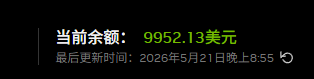
注册到最后你要看到如图所示就是符合资格:

2,创建及开机(目前没有资源,需控制台抢。)
创建simulations


把oob-mgmt-server拖到主界面,点击它选择规格+系统


点击右下角的 更新配置
然后双击oob-mgmt-server点击开机

你大概率会遇到没有资源的情况,如下,那就要抢鸡了:

打开控制台
按F12 开发者模式,打开控制台,粘贴命令,回车。

运行以下脚本(记得更换其中simulations ID ):
  1. simulations ID位置在你的浏览器地址栏
复制代码


跑起来后显示HTTP Error: 400 State: REQUESTING均为正常现象,正在尝试开机,且失败重试。
  1. if (window._sMonitor?.isActive) {
  2.   window._sMonitor.destroy();
  3. }

  4. class SMonitor {
  5.   #sid = "4c5987bf-0588-4795-xxxxxxxxx-xxxxxxxxx"; //你自己的simulations ID
  6.   #intervalMs = 3000; //任务间隔 毫秒数
  7.   #abortController = null;
  8.   #timerId = null;

  9.   constructor() {
  10.     this.isActive = true;
  11.     this.#initLoop();
  12.   }

  13.   get #requestConfig() {
  14.     return {
  15.       method: "PATCH",
  16.       mode: "cors",
  17.       credentials: "include",
  18.       referrer: `https://dsx-air.nvidia.com/simulations/${this.#sid}`,
  19.       headers: {
  20.         "accept": "application/json, text/plain, */*",
  21.         "cache-control": "no-cache",
  22.         "pragma": "no-cache"
  23.       }
  24.     };
  25.   }

  26.   async #pingState() {
  27.     const timestamp = () => `[${new Date().toLocaleTimeString()}]`;
  28.     const url = `https://api.dsx-air.nvidia.com/api/v3/simulations/${this.#sid}/start/`;

  29.     try {
  30.       const response = await fetch(url, {
  31.         ...this.#requestConfig,
  32.         signal: this.#abortController?.signal
  33.       });

  34.       const rawText = await response.text();
  35.       let parsedData;
  36.       
  37.       try {
  38.         parsedData = JSON.parse(rawText);
  39.       } catch {
  40.         parsedData = rawText;
  41.       }

  42.       if (parsedData && typeof parsedData === 'object' && 'state' in parsedData) {
  43.         console.log(`${timestamp()} State:`, parsedData.state);
  44.       } else {
  45.         console.log(`${timestamp()} Raw Response:`, parsedData);
  46.       }

  47.       if (!response.ok) {
  48.         console.log(`${timestamp()} HTTP Error:`, response.status);
  49.       }

  50.     } catch (err) {
  51.         console.log(`${timestamp()} Network/Request Failed:`, err);
  52.     }
  53.   }

  54.   #initLoop() {
  55.     this.#abortController = new AbortController();
  56.    
  57.     const tick = async () => {
  58.       if (!this.isActive) return;
  59.       await this.#pingState();
  60.       if (this.isActive) {
  61.         this.#timerId = setTimeout(tick, this.#intervalMs);
  62.       }
  63.     };

  64.     tick();
  65.   }

  66.   destroy() {
  67.     this.isActive = false;
  68.     if (this.#timerId) clearTimeout(this.#timerId);
  69.     if (this.#abortController) this.#abortController.abort();
  70.     console.log("stopped and cleaned up.");
  71.   }
  72. }

  73. window._sMonitor = new SMonitor();
复制代码

3,开机后,做端口映射。
比如你要映射SSH端口:

我涂掉 的就是你的IP+映射端口

首次开机默认用户名 和密码 右下角有显示。
我的是ubuntu和nvidia
自己DD即可。
4,开启API,自动保活
免费用户默认最多保持3天活跃就给你停鸡休眠,所以需要保活。(存疑,之前是3天,但刚才试了试手动延长,竟然没提示拒绝?)
自动保活要用到API,来这里创建你的API:
https://org.ngc.nvidia.com/account/api-keys
选择好权限,创建,记住。

脚本(注意更换你的API和simulation_id):
手动跑一次,日志没问题就创建定时任务即可,脚本作者建议每6小时。
  1. #!/usr/bin/env bash
  2. set -euo pipefail

  3. NVIDIA_AIR_API_BASE="https://api.air-ngc.nvidia.com/api/v3"
  4. NVIDIA_AIR_API_KEY="你的_NGC_API_KEY"
  5. SIMULATION_ID="你的_simulation_id"

  6. target_sleep_at="$(
  7. python3 - <<'PY'
  8. from datetime import datetime, timedelta, timezone

  9. target = datetime.now(timezone.utc) + timedelta(hours=71)
  10. print(target.replace(microsecond=0).isoformat().replace("+00:00", "Z"))
  11. PY
  12. )"

  13. payload="$(mktemp)"
  14. before_body="$(mktemp)"
  15. after_body="$(mktemp)"
  16. trap 'rm -f "$payload" "$before_body" "$after_body"' EXIT

  17. printf '{"sleep_at":"%s"}' "$target_sleep_at" > "$payload"

  18. simulation_url="${NVIDIA_AIR_API_BASE%/}/simulations/${SIMULATION_ID}/"

  19. echo "target_sleep_at=$target_sleep_at"

  20. curl --ipv4 -sS \
  21.   -H 'Accept: application/json' \
  22.   -H 'Content-Type: application/json' \
  23.   -H 'User-Agent: air-sdk/1.3.1' \
  24.   -H 'X-Air-Sdk-Version: 1.3.1' \
  25.   -H "Authorization: Bearer $NVIDIA_AIR_API_KEY" \
  26.   "$simulation_url" > "$before_body"

  27. echo "before_sleep_at=$(python3 -c 'import json,sys; print(json.load(open(sys.argv[1])).get("sleep_at"))' "$before_body")"

  28. curl --ipv4 -sS -X PATCH \
  29.   -H 'Accept: application/json' \
  30.   -H 'Content-Type: application/json' \
  31.   -H 'User-Agent: air-sdk/1.3.1' \
  32.   -H 'X-Air-Sdk-Version: 1.3.1' \
  33.   -H "Authorization: Bearer $NVIDIA_AIR_API_KEY" \
  34.   --data @"$payload" \
  35.   "$simulation_url" > "$after_body"

  36. after_sleep_at="$(python3 -c 'import json,sys; print(json.load(open(sys.argv[1])).get("sleep_at"))' "$after_body")"
  37. echo "after_sleep_at=$after_sleep_at"

  38. if [ "$after_sleep_at" != "$target_sleep_at" ]; then
  39.   echo "verify failed: expected=$target_sleep_at actual=$after_sleep_at" >&2
  40.   exit 1
  41. fi

  42. echo "ok"
复制代码

完事儿,连脚本都是偷的大佬的,感觉有用的话给点个赞

评分

参与人数 1点数 +2 收起 理由
周杰伦 + 2 赞一个!

查看全部评分

爱生活,爱奶昔~

评论12

hkkLv.2 发表于 昨天 09:02 | 查看全部
大佬,牛逼!!
爱生活,爱奶昔~
周杰伦Lv.4 发表于 昨天 09:10 | 查看全部
很详细的教程
爱生活,爱奶昔~
ArcumbreLv.2 发表于 昨天 09:26 | 查看全部
账户不支持是咋回事,我用域名邮箱也不可以,是要教育邮箱吗
爱生活,爱奶昔~
longyuLv.4 发表于 昨天 10:31 | 查看全部
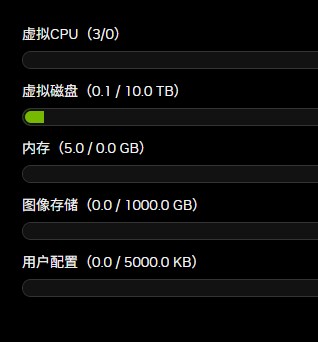
牛逼正需要,我的机子就是0CPU没有内存
爱生活,爱奶昔~
kagaLv.2 发表于 昨天 13:03 | 查看全部
第一张图片都到不了啊
爱生活,爱奶昔~
hmtdLv.2 发表于 昨天 13:13 | 查看全部
厉害啊大佬,支持一下
爱生活,爱奶昔~
credit100Lv.4 发表于 昨天 16:27 | 查看全部
There was an error creating your free trial.

爱生活,爱奶昔~
yroiwueiorqwueiLv.3 发表于 昨天 19:18 | 查看全部
There was an error creating your free trial.

Failed to start your free trial. Please contact support.
爱生活,爱奶昔~
yamlLv.3 发表于 昨天 19:42 | 查看全部
各种失败,启动不了,羊毛太难薅了
爱生活,爱奶昔~
ethanhooksLv.8 发表于 昨天 20:51 | 查看全部
本帖最后由 ethanhooks 于 2026-5-21 21:01 编辑

这机器默认开出来的机器都是10G硬盘,我设置成100G也是10G,就开了一台1C1G 和2C4G 2台机器
fakename.png
好像已经取消了 CPU和内存限制了 我也是配额是0
fakename.png
但是机器没关。你们还有配额吗
Org JQ will exceed its concurrent cpu limit by starting this sim. The cpu limit is 0 vCPU, this sim requires 1 vCPU, and this org is already using 3 vCPU.
爱生活,爱奶昔~
Ra1ndownLv.2 发表于 昨天 22:19 | 查看全部
创建免费试用时出现了错误。

未能启动免费试用。请联系客服。
爱生活,爱奶昔~
ki1418Lv.1 发表于 昨天 22:35 | 查看全部
Failed to start your free trial. Please contact support.
爱生活,爱奶昔~

回复

您需要登录后才可以回帖 登录 | 注册

本版积分规则

© 2026 Naixi Networks. 沪ICP备13020230号-1|沪公网安备 31010702007642号手机版小黑屋RSS
返回顶部 关灯 在本版发帖
快速回复 返回顶部 返回列表